Creative Laser Cut Designs for Kids: Backpack Tags & Name Labels
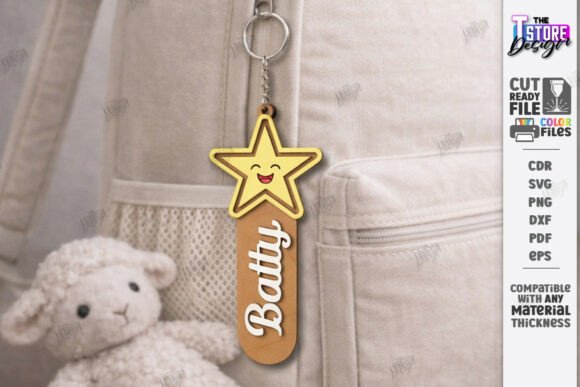
Imagine the delight on a child's face when they see their name, beautifully crafted in wood, attached to their favorite backpack. This is the magic of a Personalized Backpack Tag Laser Cut design file, a versatile digital asset that transforms a simple school bag into a cherished accessory. Perfect for crafters, small business owners, and parents alike, these files offer a unique way to create durable, charming, and entirely custom name tags that stand out from generic store-bought options.
At its core, this product is a comprehensive design package tailored for laser cutting machines. It includes all the necessary file formats—SVG, EPS, PNG, PDF, and DXF—ensuring compatibility with most software and hardware. The design process is streamlined with clear instructions: red lines indicate where to cut, and black lines are for engraving. This simplicity makes it accessible even for those new to laser cutting, allowing you to focus on the creative fun of personalization. Whether you're using a Glowforge, a CNC router, or another compatible machine, these files are engineered for a smooth workflow and professional results.
The creative applications extend far beyond just backpack tags. These layered wood designs serve as excellent design assets for a variety of projects.
- Kids' Accessories: Create matching name labels for lunch boxes, pencil cases, and sports bags.
- Nursery Decor: Design charming keychains or wall hangings for a child's room.
- Small Business Products: Offer personalized, handmade items at craft fairs or online shops, tapping into the growing market for custom children's accessories.
- Gift Making: Craft unique, heartfelt gifts for birthdays, baby showers, or back-to-school season.
One of the standout features of this digital product is its thematic variety. The designs include beloved motifs like dinosaurs, unicorns, and butterflies, appealing to a wide range of children's interests. The 3D layered construction adds depth and visual interest, turning a simple name tag into a miniature piece of art. This approach mirrors principles in modern typography and graphic design, where dimension and texture create a more engaging visual experience. Just as a skilled designer selects a premium font to convey a specific mood, choosing the right animal or shape for a tag adds a layer of personal meaning.
For those integrating these creations into a broader brand or product line, consistency is key. The style of these tags can complement other design assets like custom packaging, thank-you cards, or social media graphics. This creates a cohesive brand identity that feels polished and professional. Think of the tag's design language—playful, layered, and personalized—as a visual typeface for your brand's personality. Pairing it with complementary elements in your packaging design or web design can strengthen recognition and appeal.
When selecting and using these files, a few practical tips can enhance your results. First, always do a test cut on scrap material to perfect your machine's speed and power settings. Second, consider the wood type and thickness; different materials will yield different aesthetic results. Third, for software like Lightburn, as noted in the product description, using the DXF file format often provides more accurate dimensions than SVG. This attention to detail ensures your final product looks exactly as intended, reflecting the care and quality that customers value.
Ultimately, a well-designed digital file like this is more than just a template; it's a gateway to creating meaningful, personalized objects. It empowers makers to produce items that carry sentimental value, foster a sense of ownership for children, and offer a tangible, high-quality alternative in a digital world. By choosing versatile and thoughtfully crafted design assets, you invest in the potential to create not just products, but cherished memories.